Can MacBook Air M3 Run GTA 5? Gaming Performance Explored
Explore the MacBook Air M3’s ability to run GTA 5, including hardware limits, compatibility options, and performance tips.
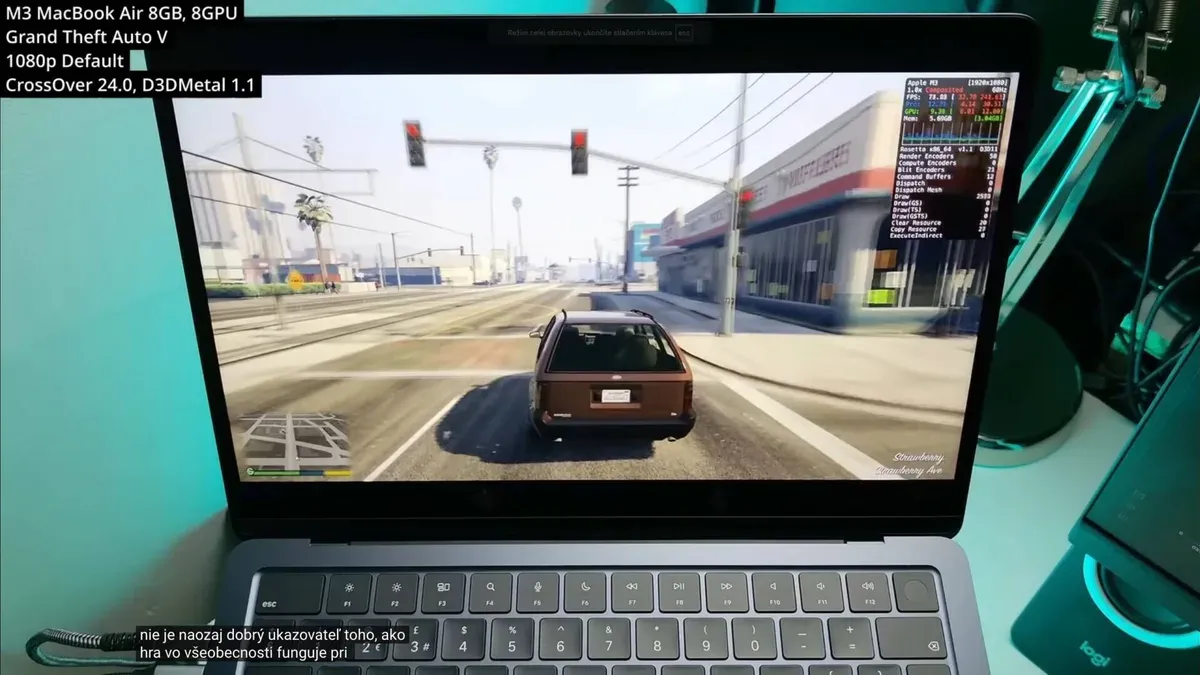
Many MacBook Air M3 owners wonder if their laptop can handle playing GTA 5 smoothly. This article examines the MacBook Air M3’s gaming capabilities, the challenges of running GTA 5 on macOS, and practical optimizations to improve performance.
Understanding the MacBook Air M3’s Hardware and Its Gaming Potential
The MacBook Air M3 uses Apple’s M3 chip, combining CPU and GPU cores on a single system-on-chip (SoC). The GPU has multiple cores optimized for energy efficiency and graphics rendering, with improvements over previous models. However, it is primarily designed for everyday tasks rather than intensive gaming.
Memory options range from 8GB to 24GB of unified RAM, influencing game loading times and multitasking. While storage speed affects asset loading, it does not directly impact frame rates.
The fanless design keeps the MacBook Air M3 thin and silent but limits heat dissipation during extended gaming. Thermal throttling can occur after prolonged high-load use, reducing clock speeds and lowering frame rates. Users should monitor temperatures and consider shorter gaming sessions or external cooling aids to mitigate this.
How GTA 5 Runs on macOS: Native, Emulated, or Streaming Options
GTA 5 lacks a native macOS version, so direct installation on the MacBook Air M3 is unavailable. Players commonly use compatibility layers like Wine or CrossOver to run the Windows version. These translate Windows system calls to macOS but introduce performance overhead and occasional compatibility challenges.
Running GTA 5 through Wine or CrossOver often requires adjusting settings such as enabling DirectX 11 support within the compatibility layer and installing necessary Windows components like Visual C++ redistributables. Performance is generally lower than on native Windows due to translation layers and driver limitations.
Cloud gaming services such as GeForce Now or Xbox Cloud Gaming stream gameplay from remote servers, bypassing local hardware constraints. This approach depends heavily on a stable, low-latency internet connection. While it can deliver smooth frame rates and high graphical fidelity, users may experience input lag and video compression artifacts.
Optimizing GTA 5 Performance on MacBook Air M3
Improving GTA 5 performance involves adjusting in-game graphics settings. Setting the resolution to 1280x720 (720p) balances clarity and speed. Lowering texture quality to Medium or Low reduces GPU load. Disabling anti-aliasing, shadows, and advanced effects like reflections helps maintain smoother frame rates.
Currently, the MacBook Air M3 does not support external GPUs (eGPUs) due to hardware and macOS driver restrictions on Apple Silicon, limiting graphics upgrade options.
Managing macOS system resources is crucial. Closing unnecessary background applications via Activity Monitor frees CPU and memory. Disabling automatic updates during gaming sessions prevents interruptions. In System Preferences, setting Energy Saver to "Better Performance" prioritizes CPU and GPU resources over battery life.
Example: Step-by-Step to Improve GTA 5 FPS on MacBook Air M3
- Launch GTA 5 and open the Graphics settings menu.
- Set resolution to 1280x720 to reduce GPU load.
- Lower texture quality to Medium or Low to decrease memory usage.
- Disable anti-aliasing and shadows to improve frame rates.
- Quit all non-essential apps using Activity Monitor to free system resources.
- In macOS System Preferences, under Energy Saver, select "Better Performance" to prioritize processing power.
- Restart the laptop before gaming to clear cached processes and reduce thermal buildup.
These steps help reduce thermal throttling and improve frame rate stability during gameplay.
Comparing MacBook Air M3 Performance with Other Devices for GTA 5
| Device | Typical GTA 5 Frame Rate | Notes |
|---|---|---|
| MacBook Air M3 (via CrossOver) | 20-30 FPS | Lower settings; thermal limits; performance varies with compatibility layer configuration |
| Mid-range Windows Laptop | 40-60 FPS | Dedicated GPU, native Windows support |
| MacBook Pro (M2 or M3 Max) | 30-50 FPS | Better cooling, more GPU cores |
| Dedicated Gaming PC | 60+ FPS | High-end GPUs, optimized drivers |
The MacBook Air M3 performs adequately compared to similar ultrabooks but falls short of Windows laptops with dedicated graphics cards and gaming PCs. The absence of a native game version and hardware limitations restrict maximum frame rates and graphical fidelity.
Who Should Consider Playing GTA 5 on MacBook Air M3 and Who Should Not
This setup suits casual gamers who value portability and accept moderate performance with occasional visual compromises. It is suitable for convenience-focused play rather than competitive gaming.
Competitive players or those needing consistent high frame rates should avoid relying on the MacBook Air M3 for GTA 5 due to thermal design and software compatibility limits.
Alternatives include cloud gaming platforms or Windows laptops with dedicated GPUs when gaming performance is a priority.
Limitations and Caveats
This article focuses on the MacBook Air M3 and does not cover older MacBook models or machines with M1 or M2 chips. Due to macOS compatibility layers and evolving software, flawless GTA 5 performance cannot be guaranteed. Updates to macOS, M3 chip drivers, or GTA 5 itself may affect gameplay quality.
Frequently asked questions
Can I install GTA 5 directly on the MacBook Air M3 without Windows?
No. GTA 5 does not have an official macOS version, so direct installation without Windows or compatibility layers is not possible.
What graphics settings should I use for the smoothest GTA 5 gameplay on MacBook Air M3?
Lower resolution to 720p or 1080p, reduce texture quality to Medium or Low, and disable shadows and anti-aliasing to improve frame rates.
Is using an external GPU (eGPU) worth it for playing GTA 5 on the MacBook Air M3?
The MacBook Air M3 does not support eGPUs due to hardware and macOS driver restrictions, so this option is currently unavailable.
How does cloud gaming compare to local play for GTA 5 on this laptop?
Cloud gaming can deliver smoother frame rates and higher graphics quality without taxing the MacBook Air’s hardware but requires a stable, low-latency internet connection and may introduce input lag.