Can MacBook Air M3 Run Valorant? Practical Guide to Gameplay
Explore how to play Valorant on MacBook Air M3 using cloud gaming and other methods despite the lack of native macOS support.
If you own a MacBook Air M3 and wonder if it can handle Valorant, this guide explains what it takes to play the game on this device. Valorant does not natively support macOS, so running it on Apple Silicon like the M3 involves specific methods and compromises. Understanding these is key to a smooth experience.
Overview of Valorant’s System Requirements and Mac Compatibility
Valorant is a competitive first-person shooter designed exclusively for Windows PCs. Riot Games provides official system requirements that include a Windows 10 64-bit OS, a minimum Intel Core 2 Duo E8400 CPU or AMD equivalent, and an NVIDIA GeForce 8600M or Intel HD 3000 GPU. Recommended specs call for a better CPU such as the Intel i3-4150 and a dedicated GPU like the NVIDIA GeForce GT 730.
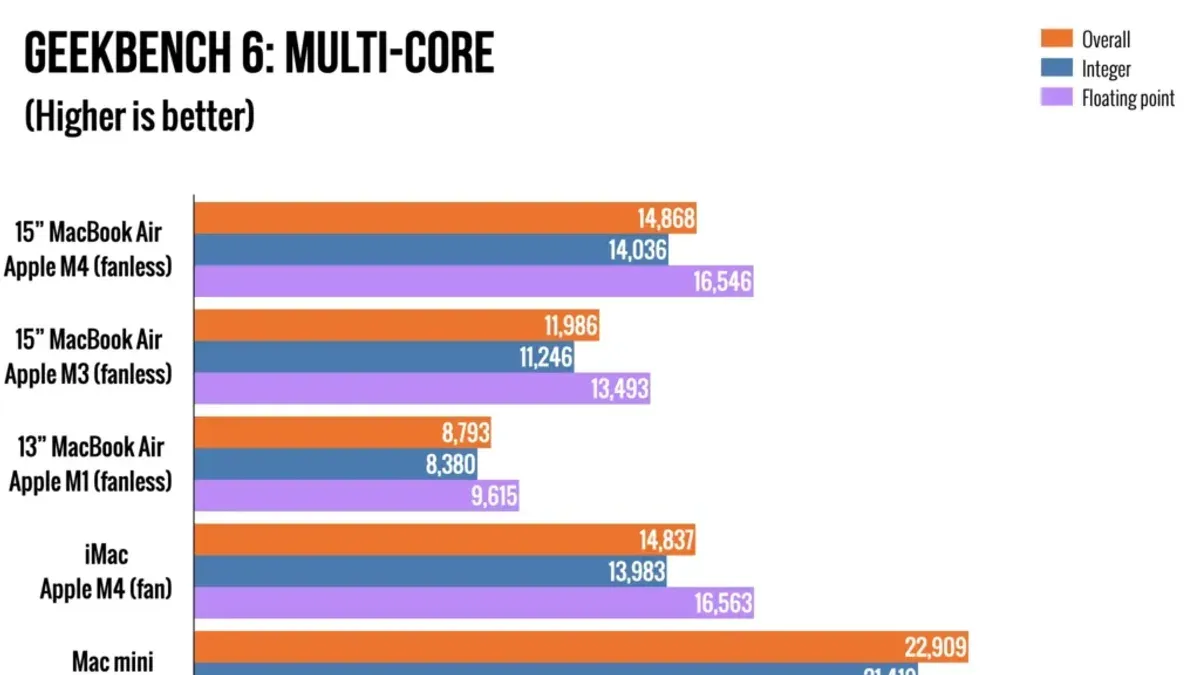
The MacBook Air M3 features Apple’s latest M3 chip, combining an 8-core CPU and GPU with unified memory architecture optimized for efficiency and battery life rather than raw gaming power. While the M3 chip outperforms many previous MacBook Air models in general tasks, it was not designed with native Windows gaming in mind.
Valorant is not officially supported on macOS because Riot Games has not developed a macOS version. This is partly due to the game’s reliance on anti-cheat software that only works on Windows, and the complexity of porting the game to Apple Silicon architectures. As a result, playing Valorant on a MacBook Air M3 requires workarounds.
How to Run Valorant on MacBook Air M3: Methods and Setup
There are three main ways to play Valorant on a MacBook Air M3: cloud gaming, virtualization or compatibility layers, and Boot Camp-like installations. Each has pros and cons.
- Cloud gaming services: Platforms like NVIDIA GeForce Now allow you to stream Valorant from Windows servers to your MacBook Air. This bypasses compatibility issues and hardware limits but depends heavily on a fast, stable internet connection to minimize latency and input lag.
- Virtual machines and compatibility layers: Using tools such as Parallels Desktop to run Windows on your Mac is popular, but Valorant’s Vanguard anti-cheat system blocks play inside virtual environments. Therefore, these methods typically do not work with Valorant.
- Boot Camp alternatives: Boot Camp does not support Apple Silicon Macs, so traditional dual-booting Windows on the MacBook Air M3 is not possible. While some experimental virtualization exists, performance and compatibility remain inadequate for Valorant.
Among these, cloud gaming is the most viable option currently. To set it up:
- Create an account on a supported cloud gaming platform like GeForce Now.
- Link your Riot Games account or purchase Valorant through the platform if required.
- Connect to a server region close to your location to minimize latency.
- Use a wired Ethernet connection or a high-quality 5GHz Wi-Fi network to reduce latency and packet loss.
- Launch Valorant through the cloud client and adjust in-game settings such as lowering shadows and texture quality to reduce encoding load and improve responsiveness.
This method avoids the need to install Windows or Valorant locally and works around anti-cheat restrictions.
Performance Expectations: Frame Rates, Latency, and Visual Quality
When playing Valorant on MacBook Air M3 via cloud gaming, frame rates are generally capped by the streaming service, often targeting 60 FPS at 1080p resolution. The MacBook Air M3’s display and hardware can smoothly render this output, but visual quality depends largely on the streaming bitrate and network stability.
Local performance running Valorant natively is not possible without Windows, so direct frame rate comparisons do not apply. Cloud gaming introduces latency that varies depending on your internet connection quality and proximity to the server, which can affect reaction times compared to native play on a Windows laptop with similar specs.
Compared to other Macs, the MacBook Air M3’s efficient screen and hardware handle streaming well. Versus Windows laptops in the same price range, native Valorant gaming on those machines offers lower latency and higher frame rates without streaming compromises.
Optimizing Your MacBook Air M3 for the Best Valorant Experience
To improve gameplay when streaming Valorant:
- Set your MacBook Air M3’s power mode to “High Performance” under System Settings > Battery > Energy Mode to reduce CPU/GPU throttling.
- Use a wired Ethernet adapter or a high-speed 5GHz Wi-Fi network to reduce latency and packet loss.
- In Valorant’s in-game settings, lower graphics options such as shadows, textures, and effects to reduce encoding load on the streaming server and improve responsiveness.
- Close unnecessary background apps on your Mac to free system resources and bandwidth.
- Ensure your MacBook Air M3 is connected to a power source to prevent performance throttling due to battery saving.
Implementing these steps can reduce input lag and improve visual smoothness during cloud gaming sessions.
Who Should Consider Playing Valorant on MacBook Air M3 and Who Should Not
The MacBook Air M3 is suitable for casual gamers and those who enjoy cloud gaming services for occasional Valorant play without investing in dedicated Windows hardware.
Competitive players requiring ultra-low latency, precise input, and the full native experience should consider gaming desktops or Windows laptops with supported GPUs and processors.
Mac users demanding native macOS support will find no official solution at present and should look to alternative games or platforms.
For users needing more performance, a dedicated Windows gaming machine or a console paired with the MacBook for other tasks is advisable.
Caveats
This article does not cover any cheating software or unsupported hacks to run Valorant on macOS. Such methods violate game terms and risk permanent account bans.
Frequently asked questions
Can I install Valorant directly on MacBook Air M3?
No. Valorant does not have a macOS version and cannot be installed natively on the MacBook Air M3.
What is the best way to play Valorant on a MacBook Air M3?
Using cloud gaming services like NVIDIA GeForce Now is currently the most practical and supported method.
How does cloud gaming performance for Valorant compare to native Windows gaming?
Cloud gaming generally has higher latency and slightly reduced visual fidelity due to streaming compression. Native Windows gaming offers lower input lag and potentially higher frame rates.
Will running Valorant on MacBook Air M3 damage my device or reduce battery life?
Playing via cloud gaming places minimal local load, so it does not harm the device but can reduce battery life due to sustained screen use and networking. Running intensive virtual machines is not recommended.