Why Mac Is Better Than Windows: A Clear Guide for Thoughtful Buyers
Explore why Mac is better than Windows for developers and creatives, highlighting performance, security, and workflow advantages.
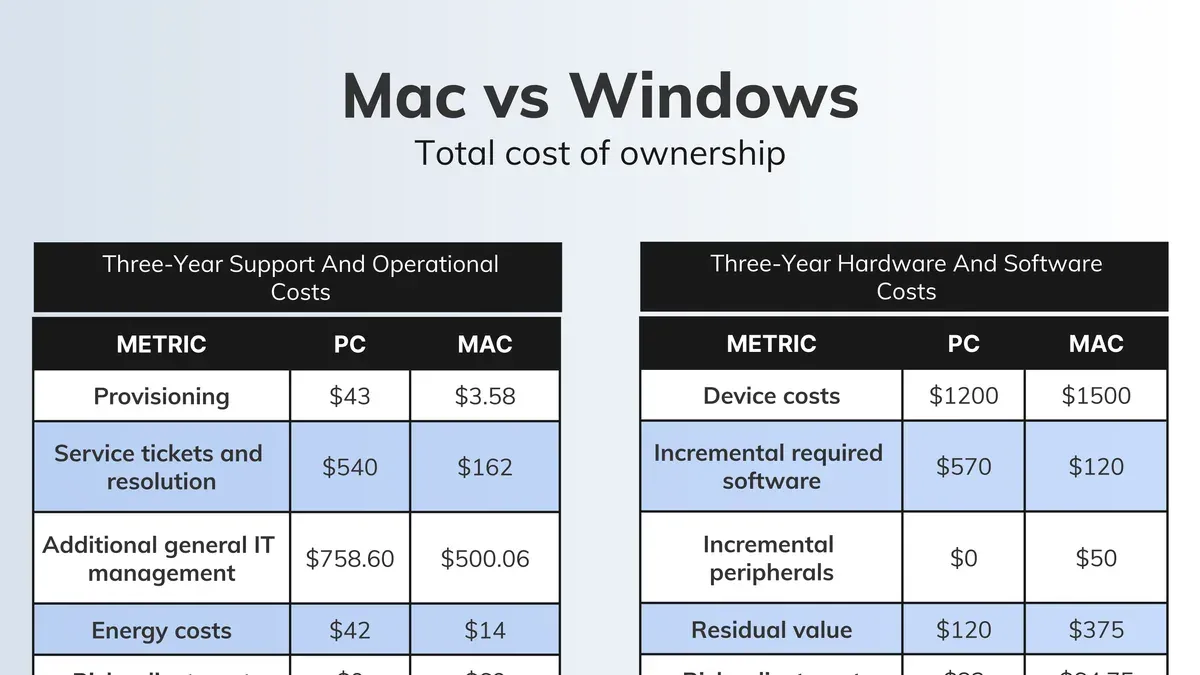
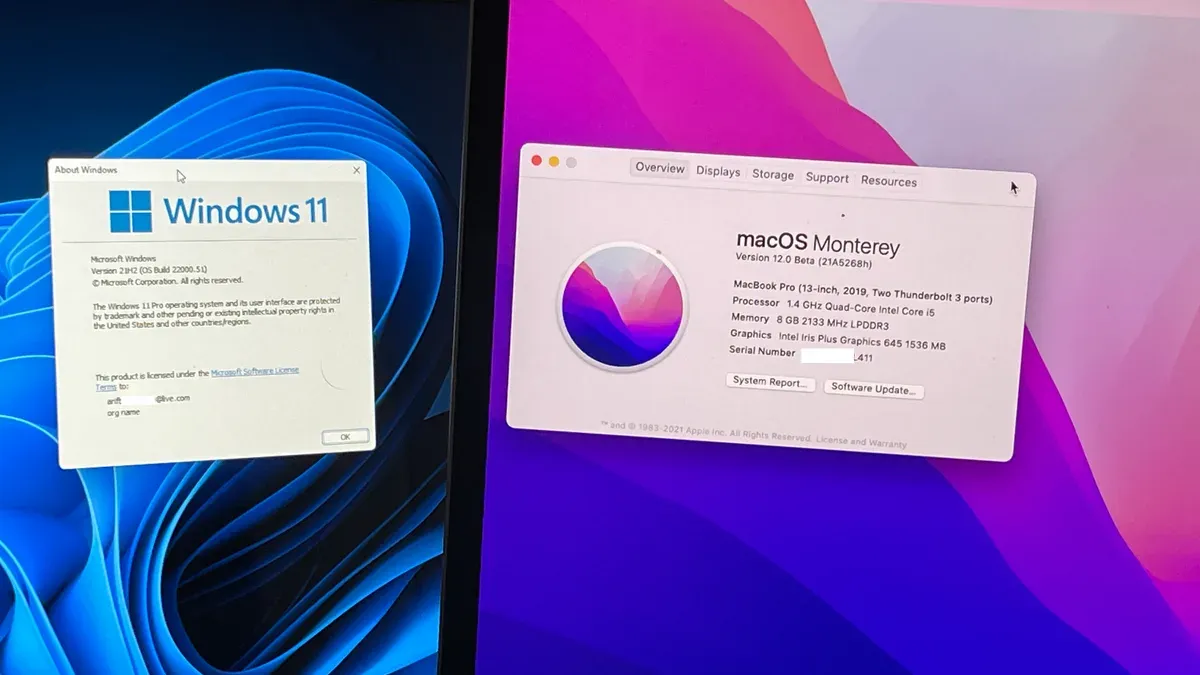
You’re considering whether to invest in a Mac or a Windows PC, especially if your work involves coding, designing, or editing. You might have heard a lot about why Mac is better than Windows but want a clear, practical explanation tailored to your needs as a developer or creative professional.
This article walks you through the strengths of both systems, focusing on why Macs tend to suit developers and creatives better while honestly acknowledging the scenarios where Windows excels. By understanding these key differences, you can make a more informed choice that fits your workflow and priorities.
Key takeaways
- MacOS offers a Unix-based environment that simplifies coding and development tasks.
- Windows supports a broader range of software and hardware, useful for specialized needs.
- Macs provide optimized tools and performance for creative workflows like video editing.
- MacOS has robust built-in security features, reducing vulnerability to malware.
- Windows PCs offer more customization and gaming capabilities, which might be crucial depending on your use case.
Why mac os is better than windows
Macs are often preferred over Windows PCs because they combine a tightly integrated hardware and software ecosystem that delivers enhanced stability and a seamless user experience. Apple controls both the physical components and the macOS operating system, allowing them to optimize performance and reduce compatibility issues that can cause crashes or slowdowns on Windows machines. This integration is reflected in benchmarks where Macs typically experience fewer system freezes and smoother multitasking.
macOS also provides native Unix-based tools like Terminal, SSH, and scripting environments, which are built into the system without additional setup. These tools are highly valued by developers and coders who rely on command-line interfaces and Unix utilities for efficient workflows, making Macs a natural fit for programming tasks. Windows can support these tools but often requires extra configuration or third-party software.
On the security front, Macs benefit from a system architecture designed to limit unauthorized software execution by default, alongside features like Gatekeeper and System Integrity Protection. While no system is invulnerable, documented security incident rates suggest Macs face fewer malware attacks compared to Windows, largely due to these built-in protections and Apple's controlled app ecosystem.
Why windows system is better than mac
Windows systems excel in offering a wide variety of hardware options and customization possibilities. Unlike Macs, which have a limited range of models, Windows PCs come from numerous manufacturers, allowing you to select from countless configurations, including high-performance gaming rigs, budget laptops, or custom-built desktops tailored to your needs. This variety often means you can find a Windows machine that fits your specific budget and performance requirements more precisely.
Software availability is another strong point for Windows. It supports a broader range of applications, particularly in gaming and enterprise environments. Many professional and legacy software tools run exclusively or better on Windows, making it essential in certain business contexts. For example, major CAD software and some specialized enterprise resource planning (ERP) systems primarily target Windows.
Affordability and upgradeability further distinguish Windows PCs. You can often buy a capable Windows machine for less than a Mac with similar specs, and many Windows desktops and laptops allow easier hardware upgrades, such as adding more RAM or swapping out storage. This flexibility contributes to a longer usable lifespan and more tailored performance improvements over time.
Why is mac better than windows for coding
Macs are often preferred for coding because macOS is built on a Unix foundation, which aligns closely with many programming environments. This means you get immediate access to powerful native developer tools like Terminal, which supports Bash or Zsh shells, and strong scripting capabilities without extra setup. In contrast, Windows requires additional steps like installing Windows Subsystem for Linux (WSL) or third-party tools to achieve similar functionality.
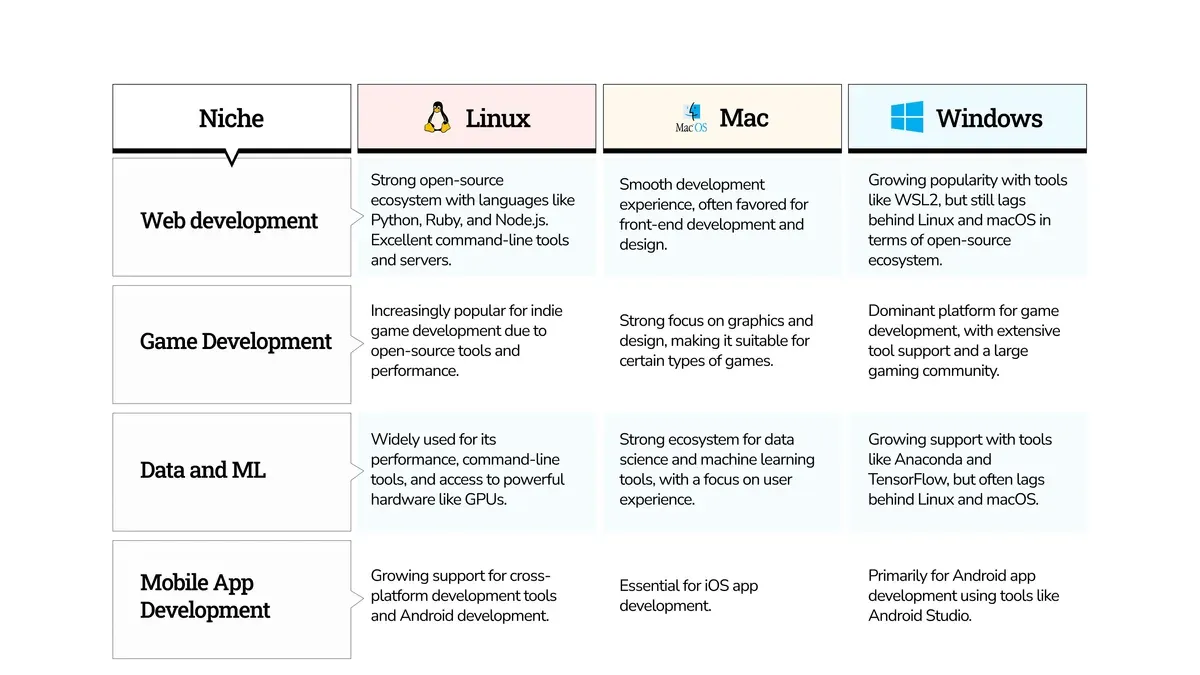
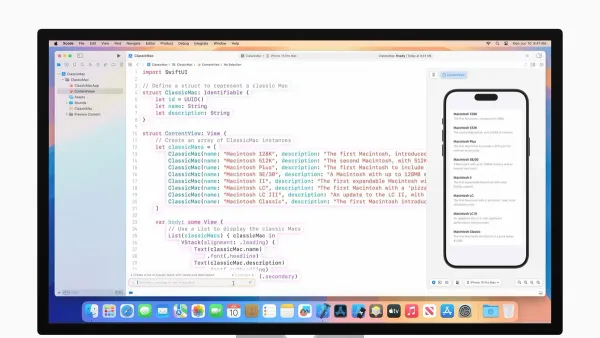
Macs natively support popular development tools and frameworks such as Docker and Homebrew, simplifying package management and containerization. Xcode, Apple's integrated development environment, provides seamless support for Swift and Objective-C development, which is not available on Windows. This native compatibility reduces the need for workarounds and streamlines the coding workflow.
Another advantage is the consistency in hardware and software on Macs, which cuts down on setup and compatibility issues. Developers often report faster toolchain setup times on macOS because the environment is more predictable and less fragmented than Windows, where hardware and driver variations can cause delays and troubleshooting. This reliability lets you focus more on coding and less on environment configuration.
Is mac better than windows for video editing
Yes, Macs are generally better suited for video editing, primarily due to their optimized hardware-software integration and industry-standard software like Final Cut Pro, which is exclusive to macOS. This integration allows Macs to handle rendering and exporting tasks more efficiently and with greater stability. For example, Final Cut Pro leverages the Mac’s Metal graphics framework to speed up rendering, often outperforming comparable Windows setups running similar software.
Windows systems support a wider variety of video editing software, such as Adobe Premiere Pro, DaVinci Resolve, and Sony Vegas, providing more options for different workflows and budgets. However, Windows machines often require manual driver updates and hardware tuning to achieve smooth performance, which can complicate the editing process and introduce instability during intensive tasks.
Performance benchmarks generally show that Macs maintain consistent speeds and fewer crashes during video editing, especially when using Final Cut Pro or Apple-optimized apps. Windows PCs can match or exceed raw performance with high-end hardware but may lack the seamless optimization that Macs deliver by default. Therefore, if your workflow centers on stability and speed with minimal setup, Macs have a clear advantage.
Why mac is more secure than windows
Macs are generally more secure than Windows PCs due to macOS’s Unix-based permission system, which restricts unauthorized access to critical system files and user data. This layered approach means that even if malware tries to execute, it often lacks the privileges to cause significant harm. Additionally, Apple’s tightly controlled app ecosystem requires all apps to be reviewed before appearing on the Mac App Store, reducing the risk of malicious software.
macOS includes built-in security features such as Gatekeeper, which blocks apps from unidentified developers unless you explicitly allow them, and System Integrity Protection (SIP), which prevents modification of essential system files. Regular, automatic security updates from Apple further protect Macs by quickly patching vulnerabilities. In contrast, Windows faces a higher volume of malware primarily because of its larger user base and more open software environment, making macOS a safer choice by default for users concerned about privacy and security.
When windows is still better than mac
Windows PCs are the better choice when you need software or games that are either exclusive to or perform best on Windows. For example, many professional tools like AutoCAD, SolidWorks, and certain financial trading platforms are Windows-only or have more robust Windows versions. Gamers also benefit from Windows PCs due to broader game compatibility and superior support for high-end graphics cards and peripherals.
Budget considerations also favor Windows machines, as they come in a wide range of prices and allow for extensive hardware customization or upgrades. This flexibility means you can build or buy a PC tailored exactly to your needs, often at a lower cost than a comparable Mac.
Lastly, if your work depends on enterprise or legacy applications tightly integrated with Windows environments—such as Microsoft SharePoint, certain custom business software, or Active Directory management—sticking with Windows ensures smoother compatibility and support. These scenarios make Windows the more practical option despite the strengths of Macs.
Frequently asked questions
Why windows are better than mac?
Windows offers broader hardware compatibility, meaning you can choose from a wide range of devices at different price points. It also supports a larger library of software, especially in gaming and specialized enterprise applications. Additionally, Windows allows more customization of system settings and hardware upgrades, which can be important if you want to build or tailor your PC experience.
Why windows is still better than mac?
Windows remains better for users who need extensive compatibility with legacy software or want to play the latest PC games. It also dominates in environments where specific enterprise tools or custom configurations are necessary. If you prefer a highly customizable system or need easy access to a variety of hardware options, Windows can be the more practical choice.
Why windows is better than mac?
Windows excels with its vast software ecosystem and support for a wide range of peripherals. It offers more flexibility for hardware upgrades, such as swapping graphics cards or increasing RAM. For users who rely on certain professional or gaming software unavailable on Mac, Windows provides clear advantages.
Why is mac so much better than windows?
Mac is often praised for its optimized hardware-software integration, resulting in smooth performance and reliability. The macOS environment offers a Unix-based terminal, which is highly valued by developers for scripting and system management. Macs also provide a cleaner user interface and tend to have longer software support and better security out of the box.
Why mac is better than windows for developers?
Macs offer native access to Unix tools and shells like zsh and bash, making development workflows straightforward without extra configuration. Popular development environments, like Xcode, are exclusive to macOS and essential for iOS and macOS app development. Also, macOS supports Docker and other container technologies well, making it easier to work across different platforms.
Honest Limits and When to Choose Differently
This advice does not cover every niche user or specific hardware model; individual preferences and needs may vary widely. For instance, gamers who prioritize the widest range of game titles and customization options might find Windows machines more suitable. Similarly, professionals relying on specialized software only available on Windows should carefully consider compatibility before switching. Mac systems excel in many areas but may not meet every unique workflow or budget constraint.
Understanding your exact needs—whether it’s software compatibility, hardware flexibility, or budget—is essential. If your work depends on software exclusive to Windows or you require extensive hardware customization, sticking with or choosing a Windows PC might be the better path. Conversely, if you value integrated hardware and software, ease of maintenance, and strong support for development and creative tools, a Mac is often advantageous.
The most useful next step is to list out the specific applications and workflows you rely on most, then verify their support and performance on both Mac and Windows platforms. Testing software trials or visiting a store to get hands-on experience can provide clarity. This practical approach ensures your choice aligns with your actual day-to-day demands rather than general recommendations.
See also: Can Mac Use External GPU? Clear Answers and How to Set It Up · Can Mac Use Steam? Clear Answers and How to Get Started · Mastering Mac Users and Groups: A Clear Guide to Managing Accounts